Need to know how many days are between two dates? Whether you’re counting down to a deadline, calculating contract durations, figuring out someone’s age in days, or managing payroll, this guide covers every method: mental math, formulas, spreadsheets, and code.
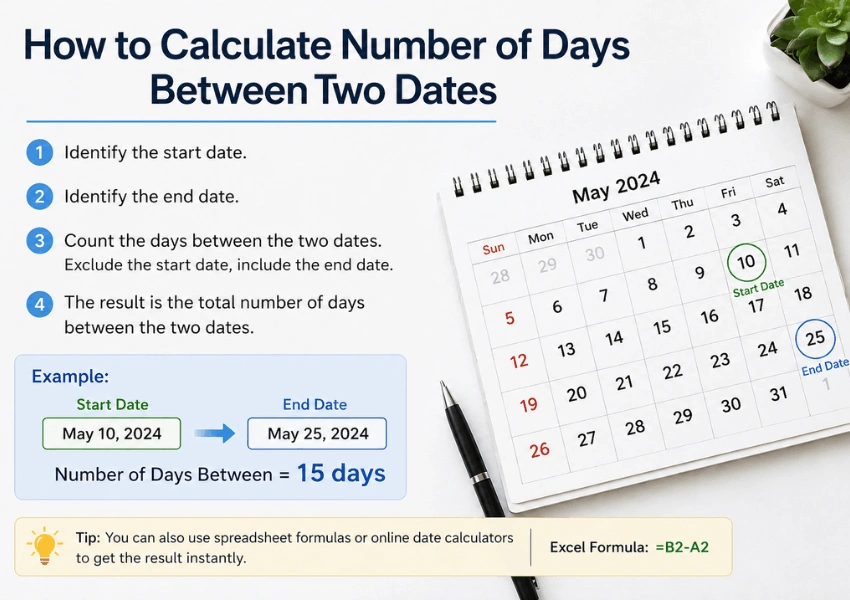
The Fastest Method: Simple Subtraction
If both dates are in the same month, just subtract:
Example: How many days are between June 5 and June 23?
23 − 5 = 18 days
For dates that span multiple months, you need a slightly different approach.
How to Calculate Days Between Two Dates by Hand
Method 1: Count Through the Calendar
This works well for short date ranges.
- Start on your first date.
- Count forward day by day (or week by week) until you reach the second date.
- The total count is the number of days between the two dates.
Example: March 28 to April 10
- March 28 → March 31 = 3 days
- April 1 → April 10 = 10 days
- Total = 13 days
Method 2: Convert to Day Numbers (Julian Day Method)
For larger date ranges, convert each date to a sequential day number within the year, then subtract.
Step 1: Find the day-of-year number for each date using this table:
| Month | Days Elapsed at Start of Month (Non-Leap Year) |
|---|---|
| January | 0 |
| February | 31 |
| March | 59 |
| April | 90 |
| May | 120 |
| June | 151 |
| July | 181 |
| August | 212 |
| September | 243 |
| October | 273 |
| November | 304 |
| December | 334 |
For a leap year, add 1 to every month from March onward.
Step 2: Add the day of the month to get the day-of-year number.
Step 3: Subtract the two day-of-year numbers.
Example: How many days are between February 14 and November 3?
- February 14: 31 + 14 = day 45
- November 3: 304 + 3 = day 307
- 307 − 45 = 262 days
If you find it difficult to do it manually, use our free Julian date calculator to automate the whole process.
Method 3: Spanning Multiple Years
When the two dates fall in different years, use this approach:
- Count the remaining days from the start date to the end of the year.
- Add the full days for any complete years in between (365 or 366 for leap years).
- Add the days from the start of the final year to the end date.
Example: How many days are between October 15, 2022 and March 4, 2024?
- Oct 15 to Dec 31, 2022: 77 days
- All of 2023: 365 days
- Jan 1 to Mar 4, 2024 (leap year): 64 days
- Total: 77 + 365 + 64 = 506 days
How to Calculate Days Between Two Dates in Excel (and Google Sheets)
Spreadsheets make this instant. Here are the most useful formulas.
Simple Subtraction Formula
=B1 - A1
Where A1 is the start date and B1 is the end date. Make sure both cells are formatted as dates. The result cell should be formatted as a Number, not a date.
DAYS Function
=DAYS(end_date, start_date)Example:
=DAYS("2025-12-31", "2025-01-01")Returns 364.
DATEDIF Function (Most Versatile)
DATEDIF is a legacy Excel function that calculates the difference in days, months, or years.
=DATEDIF(start_date, end_date, unit)| Unit | Returns |
|---|---|
| “D” | Total number of days |
| “M” | Complete months |
| “Y” | Complete years |
| “YD” | Days, ignoring years (days within the year) |
| “MD” | Days, ignoring months and years |
| “YM” | Months, ignoring years |
Example:
=DATEDIF("2023-06-01", "2025-09-15", "D")Returns 836.
NETWORKDAYS Function (Business Days Only)
If you only want to count working days (excluding weekends and optionally holidays):
=NETWORKDAYS(start_date, end_date, [holidays])Example:
=NETWORKDAYS("2025-01-01", "2025-12-31", H1:H11)Where H1:H11 contains a list of public holidays to exclude.
Google Sheets supports all of these functions with identical syntax.
How to Calculate Days Between Two Dates in Python
Method 1: Using datetime (Built-in)
from datetime import date

start = date(2024, 3, 15)
end = date(2025, 9, 28)

delta = end - start
print(delta.days)  # Output: 562
The subtraction of two date objects returns a timedelta object. The .days attribute gives the total number of days.
Method 2: From String Inputs
from datetime import datetime

start_str = "2024-03-15"
end_str = "2025-09-28"

start = datetime.strptime(start_str, "%Y-%m-%d")
end = datetime.strptime(end_str, "%Y-%m-%d")

delta = end - start
print(abs(delta.days))  # abs() handles reverse-order inputs
Method 3: Using pandas (for Data Pipelines)
import pandas as pd

start = pd.Timestamp("2024-03-15")
end = pd.Timestamp("2025-09-28")

print((end - start).days)  # Output: 562
How to Calculate Days Between Two Dates in JavaScript
const start = new Date("2024-03-15");
const end = new Date("2025-09-28");

const msPerDay = 1000 * 60 * 60 * 24;
const daysBetween = Math.round((end - start) / msPerDay);

console.log(daysBetween); // Output: 562
Use
Math.round()rather thanMath.floor()to handle daylight saving time transitions correctly — DST can shift a day by ±1 hour, causing a floor division to produce an off-by-one error.
How to Calculate Days Between Two Dates in Other Tools
SQL
-- MySQL / MariaDB
SELECT DATEDIFF('2025-09-28', '2024-03-15');  -- Returns 562

-- PostgreSQL
SELECT '2025-09-28'::date - '2024-03-15'::date;  -- Returns 562

-- SQL Server
SELECT DATEDIFF(day, '2024-03-15', '2025-09-28');  -- Returns 562
PHP
$start = new DateTime("2024-03-15");
$end   = new DateTime("2025-09-28");
$diff  = $start->diff($end);

echo $diff->days;  // Output: 562
R
start <- as.Date("2024-03-15")
end   <- as.Date("2025-09-28")

as.numeric(end - start)  # Output: 562
Common Mistakes to Avoid
1. Including or Excluding the End Date
A recurring source of confusion: is the end date itself counted?
- Inclusive counting (counting both endpoints): used in everyday speech, e.g., “a 5-day holiday from Monday to Friday.”
- Exclusive counting (not counting the end date): used in most programming languages and spreadsheet formulas.
Rule of thumb: When calculating durations (how long something lasts), use inclusive counting. When calculating elapsed time (how many days have passed), use exclusive counting.
2. Ignoring Leap Years
Leap years add one day to February. If your date range spans February 29, your manual calculation must account for it. All programming methods handle this automatically.
3. Daylight Saving Time (DST) Errors in Code
When using timestamps (rather than pure dates) in JavaScript or Python, a DST transition can make a day appear to have 23 or 25 hours. Always work with date objects (not datetime or timestamp) when counting calendar days.
4. Time Zone Mismatches
If your start and end dates are stored in different time zones, converting to UTC before calculating prevents off-by-one errors. This is especially important in databases and APIs that store timestamps with timezone offsets.
Calculating Business Days Between Two Dates
To count only working days (Monday–Friday, excluding holidays):
In Excel / Google Sheets
Use =NETWORKDAYS(start, end, holidays) as shown above.
In Python
import numpy as np

start = np.datetime64("2024-03-15")
end   = np.datetime64("2025-09-28")

# Count business days (Mon–Fri), excluding no holidays
business_days = np.busday_count(start, end)
print(business_days)  # Output: ~402

# With custom holidays
holidays = ["2024-12-25", "2025-01-01"]
business_days = np.busday_count(start, end, holidays=holidays)
Real-World Examples
Example 1: Contract Duration
A freelance contract runs from April 1, 2025 to September 30, 2025. How many days?
- April: 30 days (remaining after April 1: 29)
- May: 31, June: 30, July: 31, August: 31, September: 30
- Total: 182 days (183 inclusive)
Example 2: Age in Days
Someone born on July 20, 1990 — how old are they in days on July 20, 2025?
- 35 years × 365 days = 12,775
- Plus 9 leap years (1992, 1996, 2000, 2004, 2008, 2012, 2016, 2020, 2024) = 9 extra days
- Total: 12,784 days
Example 3: Days Until a Deadline
Today is May 1, 2025. Deadline is August 15, 2025.
- May: 30 remaining days
- June: 30, July: 31
- August: 15
- Total: 106 days
Frequently Asked Questions
1. Does “days between two dates” include the start date?
By convention, when calculating the number of days between two dates, neither endpoint is counted; you’re measuring the gap. However, when calculating duration (how many days something lasts), both the start and end days are typically included.
2. How do I calculate days between dates, including weekends?
Any of the standard methods above (subtraction, Excel’s DAYS(), Python’s timedelta) count all calendar days by default, including weekends. To exclude weekends, use NETWORKDAYS() in Excel or numpy.busday_count() in Python.
3. Why does my Excel formula return a date instead of a number?
When you subtract two date cells in Excel, the result cell may auto-format as a date. Right-click the result cell → Format Cells → choose Number to display the day count correctly.
4. How many days is 6 months?
It depends on which months. Six months can be anywhere from 181 to 184 days, depending on the calendar months involved and whether the period includes a leap day.
Summary: Which Method Should You Use?
| Situation | Best Method |
|---|---|
| Quick one-off calculation | Google search or mental math |
| Spreadsheet / reporting | Excel DAYS() or DATEDIF() |
| Business days only | Excel NETWORKDAYS() |
| Python scripting or data analysis | datetime.timedelta or pandas |
| Web development | JavaScript Date subtraction |
| Database queries | SQL DATEDIFF() |
| Large-scale date arithmetic | numpy.busday_count() |
The core principle across every method is the same: convert both dates to a common numeric scale, then subtract. Whether you’re doing it by hand, in a spreadsheet, or in code, that’s all that’s happening under the hood.